A poster
The job: an announcement for an open lab day, as one image for a social feed, and the same poster cut for stories.
A still is a beat with no time#
The poster template has one beat and no motion. Its format says the stage size, and the template offers three:
auditorium template show poster | head -3
poster: a single still for a feed or a print
An announcement, a result or an event: a kicker, a headline, a line of text, up to three numbers. Exported as one PNG.
formats: square, portrait, story (the first is the default)
| format | stage | for |
|---|---|---|
square |
1080 × 1080 | a feed post |
portrait |
1080 × 1350 | a tall feed post |
story |
1080 × 1920 | stories and status |
--format picks one when you copy the template. The layouts read the stage,
so the same markup sets its type and margins for each size:
auditorium template new poster build/poster-story --format story | tail -1
grep -n 'data-format' build/poster-story/index.html
5 files written to build/poster-story from template poster, format story; next: auditorium preview build/poster-story
16:<main class="aud" data-format="story">
The finished poster#
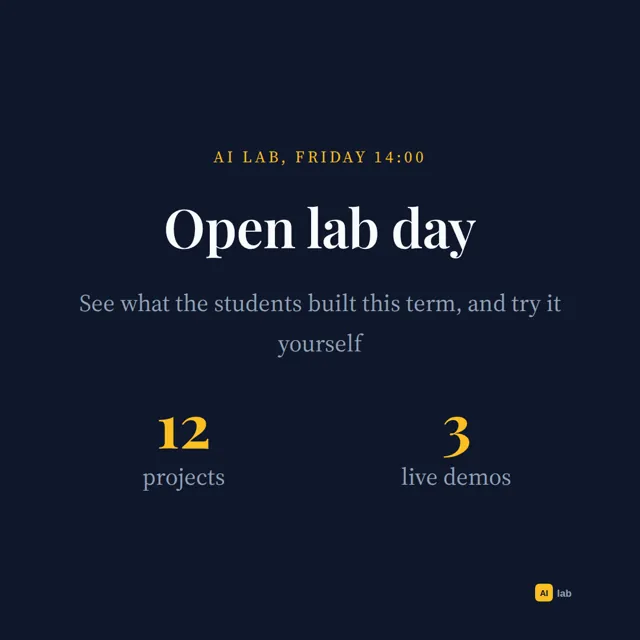
The example is the lab-day announcement. Its whole beat is a kicker, a headline, a line and two numbers:
<main class="aud" data-format="square">
  <img class="brand" src="assets/logo.svg" alt="AI lab">
  <section data-beat="poster" class="title">
    <span class="kicker">AI lab, Friday 14:00</span>
    <h1>Open lab day</h1>
    <p>See what the students built this term, and try it yourself</p>
    <div class="stats">
      <div class="stat"><b>12</b><span>projects</span></div>
      <div class="stat"><b>3</b><span>live demos</span></div>
    </div>
  </section>
</main>
<img class="brand"> is the logo slot: it sits in the corner the layouts leave
free, on every beat of every template.
Export the image#
export -f png writes each beat at its end state. A poster has one beat, so
it writes one file; --size renders the same stage at another resolution.
EX=$(python -c "import auditorium.templates as t; print(t.TEMPLATES)")
cp -r "$EX/poster/example" build/poster
auditorium check build/poster
auditorium export build/poster -f png -o build/poster-png
ls build/poster-png
0 errors, 0 warnings (structure and layout checked)
✓ 1 PNG files in build/poster-png/
beat-01.png
To cut it for stories, change data-format="square" to story in your copy
and export again; the check tells you if a line no longer fits.
auditorium export build/poster -f html -o build/gallery/poster.html
✓ build/gallery/poster.html (font 0.16 MB, image 0.00 MB, script 0.06 MB, style 0.25 MB)
334578 bytes in 1 file