A short video
The job: a vertical clip of under twenty seconds for Reels, TikTok and Shorts, telling people that a dripping tap wastes a bathtub of water a week, over music that drops when the voice speaks.
The vertical stage and its safe area#
A short is 1080 × 1920 on a clock, 15 to 60 s long. The apps lay their
buttons and captions over the top and bottom of the video, so the format has a
safe area that every layout keeps clear, the widest band each platform
documents, and one file posts to all of them. The check fails text that strays
into it.
auditorium template show short | head -3
EX=$(python -c "import auditorium.templates as t; print(t.TEMPLATES)")
cp -r "$EX/short/example" build/short
short: a vertical video, 15 to 60 s
A clip for Reels, TikTok or Shorts: a hook, a number, a line, a call to action, over a music bed that ducks under optional narration. Rendered to mp4.
formats: short (the first is the default)
A music bed that ducks#
Music is an <audio> element like any other asset. loop repeats it to the
end of the video, data-gain sets its level in the mix, and data-duck
presses it down by about 12 dB while the narration speaks:
<section data-beat="hook" data-d="5" class="title" data-say="assets/vo/01.json">
  <span class="kicker">City water</span>
  <h1 data-enter="words">A dripping tap wastes water all day</h1>
  <audio src="assets/bed.wav" data-in="0" data-gain="0.5" data-duck loop></audio>
</section>
When you have no music, auditorium music composes a bed with Euterpe, in one
of three moods. Without --length it writes one loop that tiles with no seam,
which is what <audio loop> wants; with --length it lays loops end to end,
quiet at the ends and full between, and fades them in and out. To use the result, write it into the project's
assets/ and point the <audio> at it; this book keeps the example's own bed.
auditorium music --mood bright --bpm 110 -o build/bright-bed.wav
build/bright-bed.wav: bright at 110 bpm, one seamless loop
1 loops of 8.72727 s: full
The check mixes the audio the way the render will and warns when the mix clips
or the music is louder than the voice (audio-peak):
auditorium check build/short
0 errors, 0 warnings (structure and layout checked)
Edit in place#
Some changes are faster to make by looking: a word in a headline, the moment
an element enters, the accent colour. preview --edit adds an editing pane to
the preview. Click a text on the stage to type over it; select an element to
change its motions from lists of the valid names, and drag its data-in and
data-out as handles on the scrubber; set the theme's variables with colour
pickers; or edit index.html, theme.css and script.js in a source pane.
auditorium preview build/short --edit
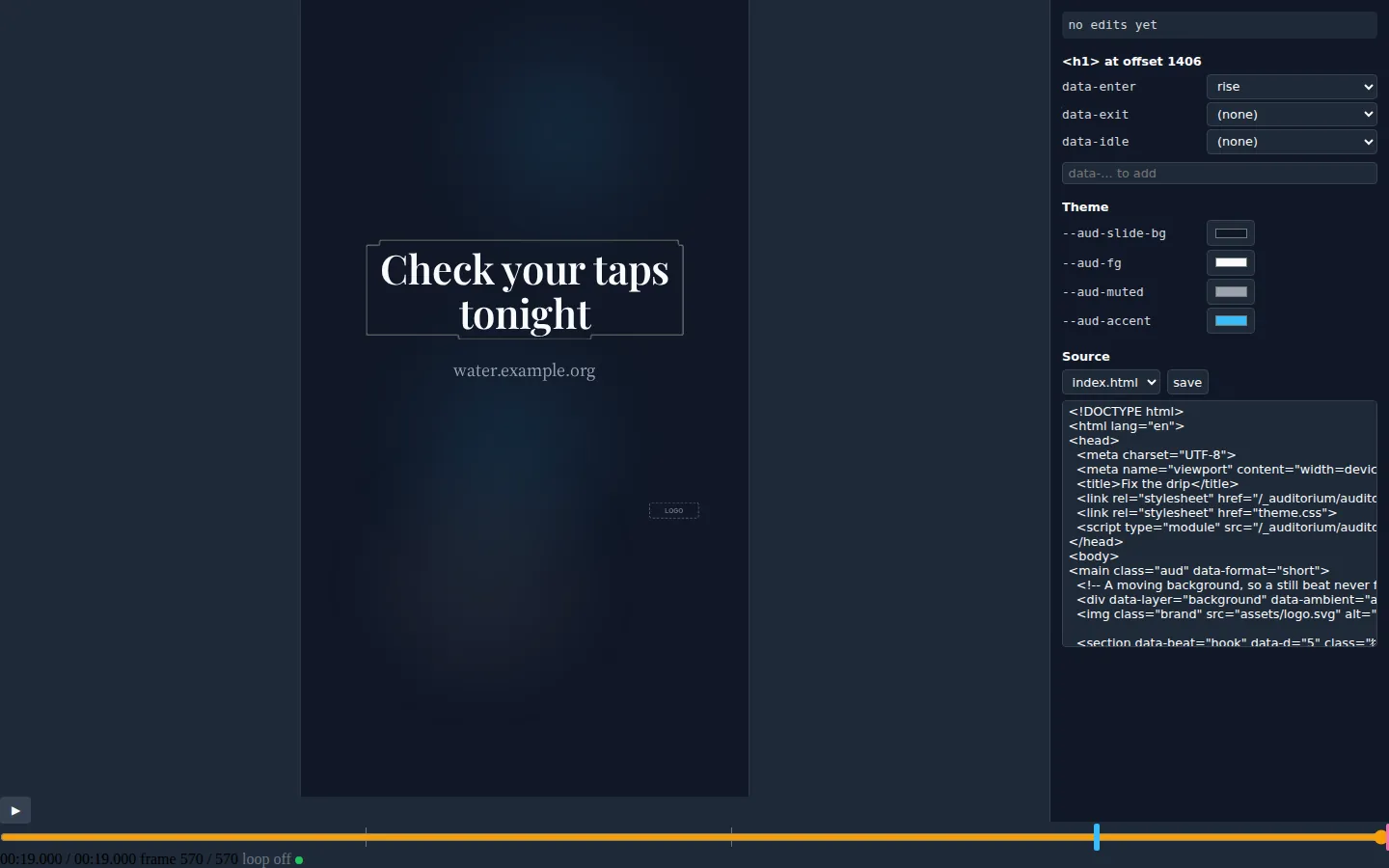
Each change rewrites only the bytes it names in the file, so your formatting
and comments survive, then reloads the stage and runs the structure pass of
the check. The editor is off unless you pass --edit, and the server writes
nothing outside the project folder.
Code that moves with time#
A short sometimes needs motion no attribute describes: a needle, a curve that
grows, a counter in a custom format. That code goes through
auditorium.track(fn, {beat, from, to}), which calls fn(seconds) on every
seek, and draws its randomness from auditorium.rng(seed):
const needle = document.querySelector("#needle");
auditorium.track((s) => {
  needle.style.rotate = `${Math.min(s, 3) * 40}deg`;
}, { beat: "number", from: 0, to: 3 });
A function of time can be seeked, so the preview, the render and the export
agree on every frame. A requestAnimationFrame loop or Math.random cannot,
and the check flags both.
Ship it#
The video itself is auditorium render build/short, an MP4 at 1080 × 1920
with the narration and the bed mixed in. The HTML version plays in a browser:
auditorium export build/short -f html -o build/gallery/short.html
✓ build/gallery/short.html (audio 0.13 MB, font 0.16 MB, image 0.00 MB, other 0.00 MB, script 0.06 MB, style 0.25 MB)
513913 bytes in 1 file
Open the short and press space to play each beat.