Quick Start
The job: a two-slide deck that says one thing, checked, previewed and shipped as a single HTML file you can send to anyone.
Install#
Version 5 is not on PyPI yet (pip install auditorium still installs 4.x), so
run it from a checkout. Auditorium drives Chromium through Playwright for the
check, the stills and the video, so install a browser once:
git clone https://github.com/gia-uh/auditorium && cd auditorium
uv sync
uv run playwright install chromium
uv run auditorium --version
The rest of this book writes auditorium for uv run auditorium.
Write the page#
A project is a folder with an index.html. The page loads the runtime from
/_auditorium/, a path the Auditorium server and the bundler both provide, and
says its format on <main class="aud">. A deck is a 16:9 stage that the
presenter advances by hand.
<!DOCTYPE html>
<html lang="en">
<head>
  <meta charset="UTF-8">
  <title>Hello, Auditorium</title>
  <link rel="stylesheet" href="/_auditorium/auditorium.css">
  <link rel="stylesheet" href="theme.css">
  <script type="module" src="/_auditorium/auditorium.js"></script>
</head>
<body>
<main class="aud" data-format="deck">
  <section data-beat="claim" class="statement">
    <p data-enter="words">Small steps beat <em>big guesses</em>.</p>
  </section>
  <section data-beat="steps">
    <h2>Three steps</h2>
    <ol>
      <li data-step="1" data-enter="rise">Measure the slope</li>
      <li data-step="2" data-enter="rise">Take a small step down</li>
      <li data-step="3" data-enter="rise">Repeat until it stops moving</li>
    </ol>
  </section>
</main>
</body>
</html>
Each <section> is a beat. data-enter="words" brings the sentence in a word
at a time. data-step="1" holds a list item back until the first press of the
presenter, so the second slide takes three presses.
Colours come from a theme, a file of CSS variables. The page names roles such
as the accent (the <em> above), and the theme picks the colour:
:root {
  --aud-slide-bg: #fbfaf7;
  --aud-fg: #1d1d1f;
  --aud-muted: #6b6b70;
  --aud-accent: #c2410c;
}
Check it#
auditorium check reads the files, then opens the page in Chromium and seeks
it to every stop, measuring what shows: overflow, overlap, contrast, type size,
script errors. It exits 1 while any error remains, and each finding names its
line and its fix.
auditorium check examples/hello
0 errors, 0 warnings (structure and layout checked)
Look at it#
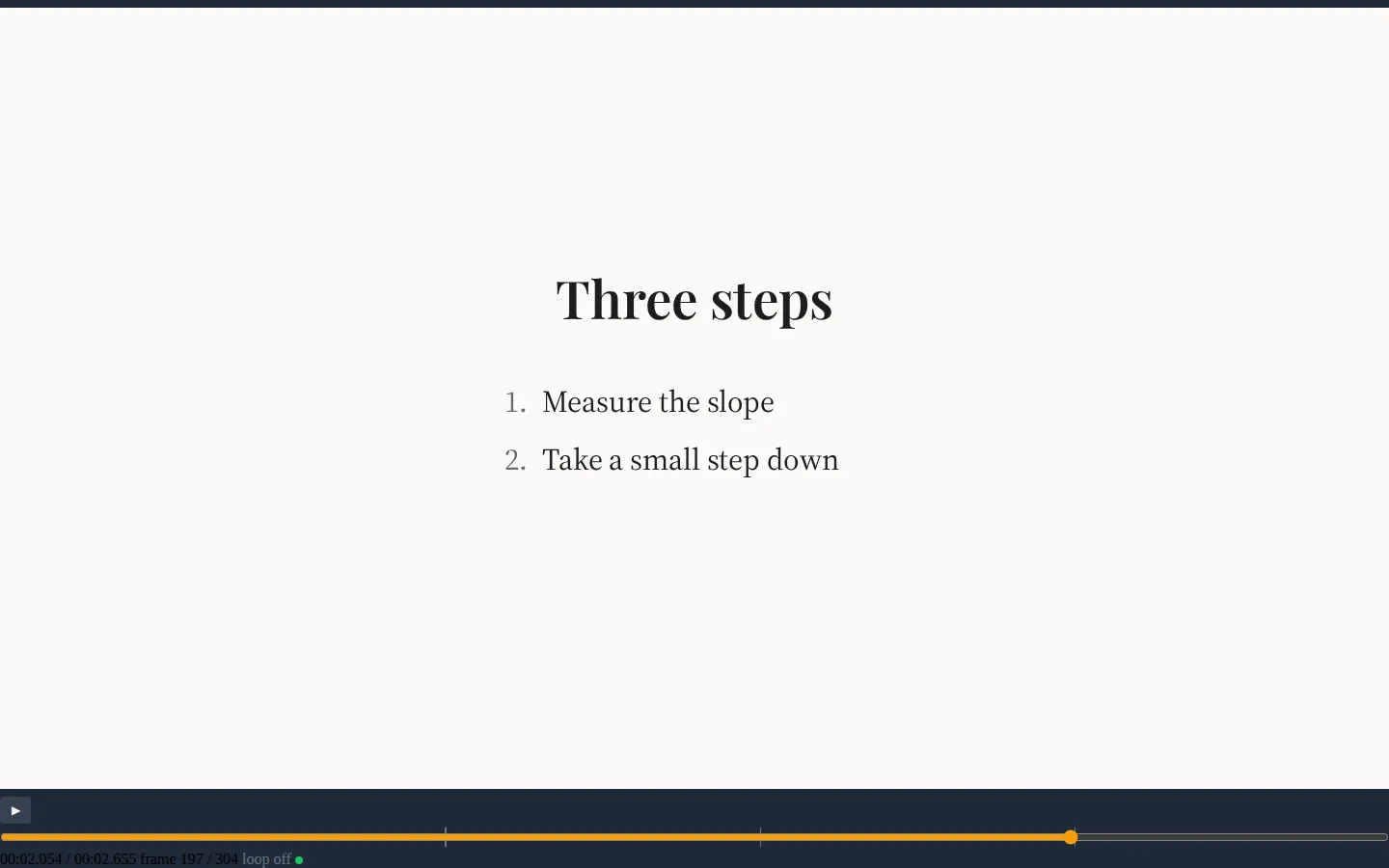
auditorium preview serves the folder and opens the authoring view: the page
on its stage, a scrubber with a tick at every stop, frame stepping with . and
,, and a loop over a range with i, o and l. Saving a file reloads the
page at the same instant.
auditorium preview examples/hello
Ship it#
auditorium bundle writes the project as one HTML file with the runtime, the
CSS, the fonts and every asset inside. It presents from disk with the arrow
keys, space or a tap, and loads nothing from the network.
auditorium bundle examples/hello -o build/gallery/hello.html
✓ build/gallery/hello.html (font 0.16 MB, script 0.06 MB, style 0.25 MB)
333842 bytes in 1 file
Open the result and press the right arrow to step through it.
What to read next#
Most work starts from a template rather than an empty folder, because a template already has the layouts, the logo slot and the beats of its kind of artifact. The next chapter starts a talk that way. For the reference of the version you have installed, ask the CLI:
auditorium help | tail -14
`auditorium help TOPIC` prints one topic; `auditorium help --all` prints them all.

assets      assets.yaml, the files, page captures and generated images a project uses
attributes  the file contract, every data- attribute and what it means
check       how to read the check's findings, and the rules it runs
components  the pieces inside a layout, as classes on plain HTML
export      one HTML file, a PDF, PNG stills, a contact sheet
formats     the seven formats, their stages and safe areas
layouts     ten beat layouts, each a class on a <section>
motion      every entrance, exit, idle, emphasis and layer preset, with its defaults
start       the loop, from an empty folder to an artifact
templates   which template for which request
themes      the theme variables, the bundled themes and the logo slot
11 topics; auditorium help TOPIC prints one