A report page
The job: a short report on water use in a district's schools, read on a phone by the school heads and printed at A4 for the council meeting, from one file.
A page has no stage#
Decks and videos have a fixed stage that scales to the screen. A report should
instead flow like a web page, so its format is page: every section shows at
once, there is no clock and no presses, and the layouts stack their columns
on a narrow screen. The check fails a page that scrolls sideways at 390 px,
the width of a small phone.
auditorium template show report | head -3
report: a long document with figures, printed to A4
A report, a brief or a write-up someone reads on a screen or on paper: a title, sections of prose, a figure, a table, a chart. Exported as an A4 PDF.
formats: page (the first is the default)
The sections are still <section data-beat>, so the same layouts work: a
figure for an SVG chart drawn in the theme's colours, a table, and a
chart whose bars are plain elements sized by a CSS variable:
<section data-beat="chart" class="chart">
  <h2>What each repair saves</h2>
  <div class="bars">
    <div class="bar" style="--v: 1"><span>cisterns</span><i></i><b>8,400 m³</b></div>
    <div class="bar" style="--v: 0.55"><span>taps</span><i></i><b>4,600 m³</b></div>
    <div class="bar" style="--v: 0.36"><span>meters</span><i></i><b>3,000 m³</b></div>
  </div>
</section>
--v is the bar's length as a fraction of the longest. The SVG figure uses
class="stroke-accent" and class="fill-ink" instead of colours, so it
follows the theme.
On a phone and on paper#
EX=$(python -c "import auditorium.templates as t; print(t.TEMPLATES)")
cp -r "$EX/report/example" build/report
auditorium check build/report
0 errors, 0 warnings (structure and layout checked)
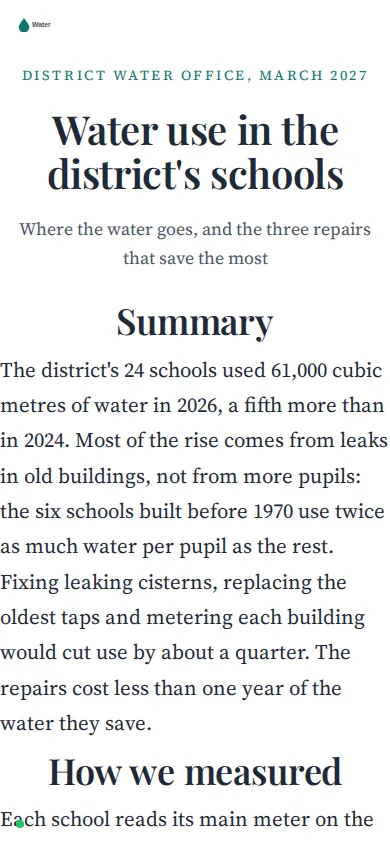
export -f pdf prints a page format through its print styles at A4. The text
stays text, so the PDF can be searched and quoted:
auditorium export build/report -f pdf -o build/report.pdf
✓ build/report.pdf
3 pages
The same folder bundles into the file you send to the school heads:
auditorium bundle build/report -o build/gallery/report.html
✓ build/gallery/report.html (font 0.16 MB, image 0.00 MB, script 0.06 MB, style 0.25 MB)
337298 bytes in 1 file
Open the report, then make the window narrow.