An explainer video
The job: a one-minute landscape video that explains how a heat pump warms a house, narrated, with each part of the figure appearing as the voice names it.
A clock instead of presses#
An explainer has the same 1920 × 1080 stage as a deck, but it plays on a
clock: each beat has a length, data-d in seconds, and the video is the beats
in a row. Every surface seeks the same timeline, so the preview, a rendered
frame and the exported HTML show the same thing at the same second.
auditorium template show explainer | head -3
explainer: a narrated landscape video, 1 to 6 minutes
A video that explains one idea out loud: a question, a statement, a figure, a comparison, numbers, a closing line, each beat with its narration clip. Rendered to mp4.
formats: explainer (the first is the default)
Narration and cues#
Each beat names its narration with data-say: an alignment JSON from a
text-to-speech service or an aligner, which gives the time of every word, and
the clip it describes. The voice starts 0.3 s into the beat.
EX=$(python -c "import auditorium.templates as t; print(t.TEMPLATES)")
cp -r "$EX/explainer/example" build/explainer
head -c 230 build/explainer/assets/vo/03.json; echo
{"audio": "03.wav", "words": [{"word": "A", "start": 0.05, "end": 0.225}, {"word": "cold", "start": 0.295, "end": 0.635}, {"word": "liquid", "start": 0.705, "end": 1.155}, {"word": "takes", "start": 1.225, "end": 1.62}, {"word": "
With word times, an element can enter when the voice says a phrase instead of
at a number of seconds. data-cue does that, so re-recording the narration at
another pace moves the figure with it:
<section data-beat="figure" data-d="10" class="figure" data-say="assets/vo/03.json">
  <h2>Outside air in, heat up</h2>
  <figure>
    <svg viewBox="0 0 800 400">
      <rect x="40" y="120" width="200" height="160" rx="16" ... data-enter="draw"/>
      <path d="M 240 200 L 560 200" ... data-cue="compressor" data-enter="draw"/>
      <circle cx="400" cy="200" r="36" class="fill-accent" data-cue="compressor" data-enter="pop"/>
      <rect x="560" y="120" ... data-cue="makes it hot" data-enter="draw"/>
    </svg>
  </figure>
</section>
The check holds a video to its voice: it fails a cue the narration never says
(cue-missing), a beat shorter than its speech (overrun), and on an
explainer or a short it warns when a beat is too short to read its text
(reading-time) or when nothing moves and nobody speaks for too long
(dead-air). The aurora layer behind the beats is there for that last rule:
a moving background keeps a still beat from freezing the video.
auditorium check build/explainer
auditorium help rule dead-air | head -6
0 errors, 0 warnings (structure and layout checked)
# rule dead-air: A stretch where nothing moves and no voice plays for longer than the format allows.

warning, layout pass. Explainers (4 s) and shorts (2 s) only: a deck waits for its presenter.

Inside each beat, the check finds the time no animation runs (an entrance, exit, idle, emphasis, camera or ambient) and no narration clip plays, then seeks it every 0.25 s and keeps the stretch only if the frames do not change, so a `track()` function or a counter counts as motion. A beat that holds still past the limit reads as a frozen video. Give the stretch something that moves, or shorten the beat.
See the whole video at once#
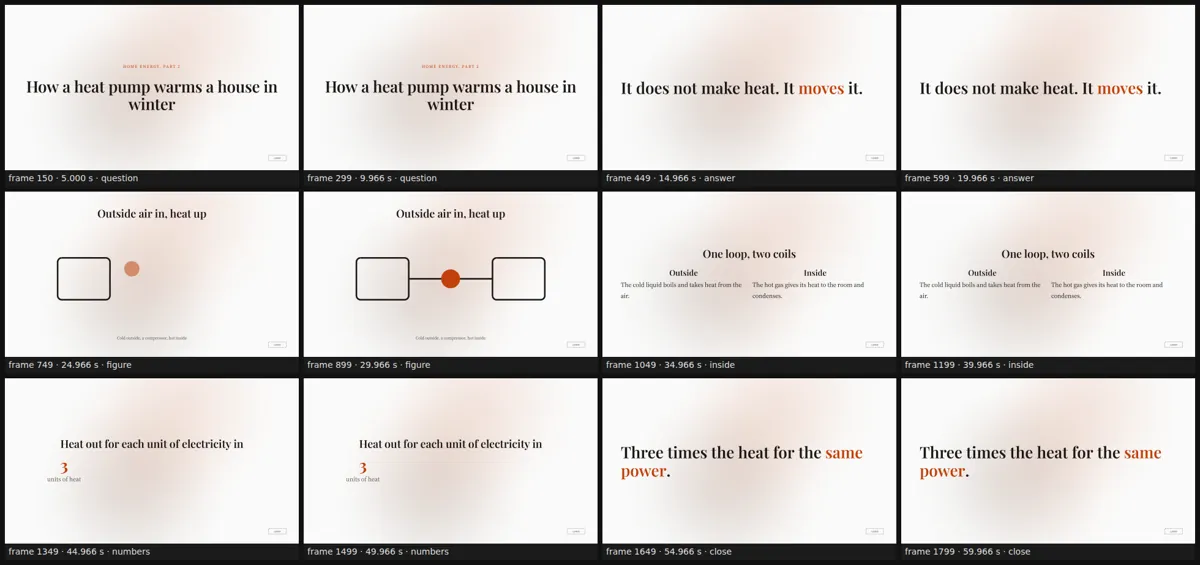
Watching a minute of video after every edit is slow. sheet lays the
timeline out as one image, each beat at its end and frames between, each tile
labelled with its frame number, time and beat:
auditorium sheet build/explainer --between 1 -o build/explainer-sheet.png | tail -3
frame   1649    54.966 s  close  (between)
frame   1799    59.966 s  close
12 tiles in build/explainer-sheet.png; auditorium render --from F --to F+1 reproduces frame F
Render#
render steps Chromium through the timeline frame by frame, captures each
frame, mixes every clip at its time, and encodes with ffmpeg. It is
deterministic: two renders of one project are byte-identical. --from and
--to render a range of frames, and --jobs splits the frames across several
browsers.
auditorium render build/explainer --fps 30            # build/explainer/dist/explainer.mp4
auditorium render build/explainer --jobs 4            # four browsers at once
This book renders no video. It renders one frame, 18 s in, as a PNG sequence of length one, which is the same code path without the encoder:
auditorium render build/explainer --format png-sequence --from 540 --to 541 -o build/explainer-frames
✓ Rendered to build/explainer-frames

The HTML version#
The bundle plays the same timeline in a browser, with its narration:
auditorium export build/explainer -f html -o build/gallery/explainer.html
✓ build/gallery/explainer.html (audio 0.27 MB, font 0.16 MB, image 0.00 MB, other 0.00 MB, script 0.06 MB, style 0.25 MB)
702822 bytes in 1 file
Open the explainer and press space: each press plays the next beat, with its voice.